General
Alt Key + underlined letter in the menu title opens the menu and/or the main point (instead of Alt F10 is also possible)
Note:
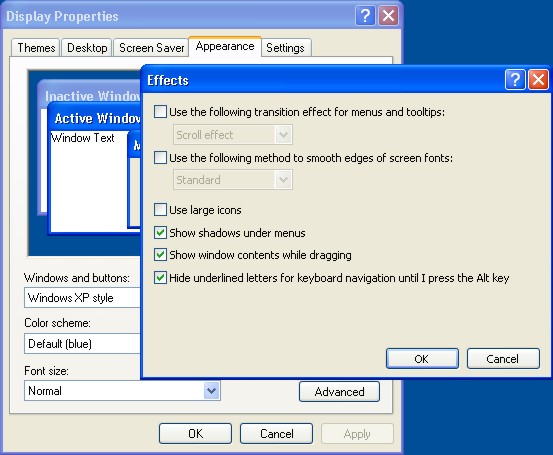
You can set up the defaults so that the letters are shown as underlined in all menus under Windows with Start/Settings/System control/Display in the “Representation” tab with the "Effects" button, while you simply remove the checkmarks from the option “Hide underlined letters for keyboard navigation”.
Esc Switch in the file selection and/or selection area
F1 Online help
F4 Opens the project time entry
↹ Tab; Switch to the next field
↲ Enter; Confirmation; if necessary. change to a new line
↓ ↑ Direction keys; Scrolling
← → Open folder/Close
Ctrl + ↓ ↑ Switch the headings in the detail view
Ctrl + F4 Close the window
Ctrl + F6 Switch between windows (Ctrl + ↹ also works)
⇧ + F2 Field editor
Space bar Display of the current window if the cursor transforms in the
window superimpose icon
In the list views
Ctrl + A Highlight everything (instead of Ctrl Alt Gr is also always possible)
Ctrl + B Opens the detail view of a list field
Ctrl + C Copy
Ctrl + F Search (values, formulas, complete word, part of a word)
Ctrl + M Menu bar in the list view
Ctrl + P Print
Ctrl + S Export document
Ctrl + V Enter
Ctrl + X Cut
Ctrl + Z Reverse
Pos1 Shows start of list
End Shows end of list
Picture ↑ Moves picture slide bar to the top
Picture ↓ Moves picture slide bar to the bottom
In the project detail view in the ”Items” column
Ctrl + A New article item
Ctrl + D Delete highlighted item
Ctrl + H New heading
Ctrl + L New current sum
Ctrl + M New multi-item
Ctrl + R New discount item
Ctrl + T New text item
Ctrl + Z New subtotal
Ctrl + 1 New direct invoicing parts item
Ctrl + 2 New direct invoicing m-item
Ctrl + 3 New direct invoicing qm-item
In word processing
Ctrl + N Open new file
Ctrl + O Open existing file
Ctrl + S Save
Ctrl + H Create print preview
Ctrl + P Print
Ctrl + E Display file in complete window
Ctrl + Z Recall editing step
Ctrl + Y Repeat editing step
Ctrl + X Cut
Ctrl + C Copy
Ctrl + V Paste
Ctrl + A Highlight all
Ctrl + F Search
Ctrl + G Find next
Ctrl + R Replace
Ctrl + T Replace next
Ctrl + J Column break
Ctrl + L Page break
Ctrl + B Bold
Ctrl + I Cursive
Ctrl + U Underline (simple)
Ctrl + M Show / hide menu bar
Ctrl + K Calculate reference now
F7 Spell check
Ctrl + ⇧ + W Soft separation
Ctrl + ⇧ + C Copy ruler
Ctrl + ⇧ + V Paste ruler
Ctrl + ⇧ + L Paragraph left justified
Ctrl + ⇧ + R Paragraph right justified
Ctrl + ⇧ + J Justified
Ctrl + ⇧ + F Opens format window for the sign
Ctrl + ⇧ + P Opens format window for the paragraph
Ctrl + ⇧ + T Opens format window for the tab
Ctrl + ⇧ + B Opens format window for the border
Ctrl + ⇧ + S Opens format window for the style sheet